
Lodging your Terminal Illness claim
You didn’t choose this path, but you’re not alone. We’ve simplified the process so you can focus on the things that matter.
Find the right steps for you
If you're lodging a Terminal Illness (TI) claim, stay here. For Total Permanent Disablement (TPD) or Income Protection (IP), click your claim type.
Access your claim
If you need help, contact us at MetLife on 1800 221 599 (Mon-Fri, 9am–5pm AEST, excluding national public holidays).
1. Complete the Online Claim Lodgement form
Open your claim
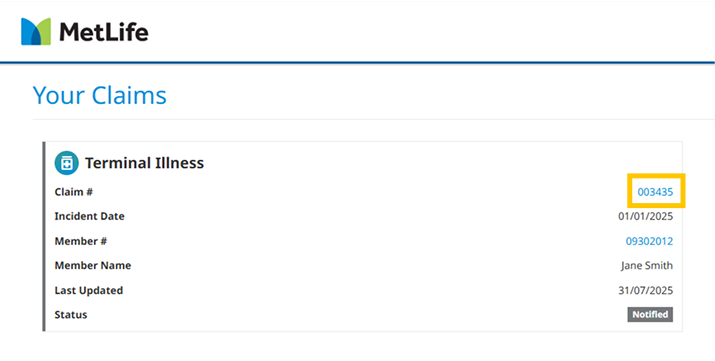
On the dashboard, click your claim number (e.g. 123456) to open your claim. This is where you’ll find all the information and steps to complete your claim.
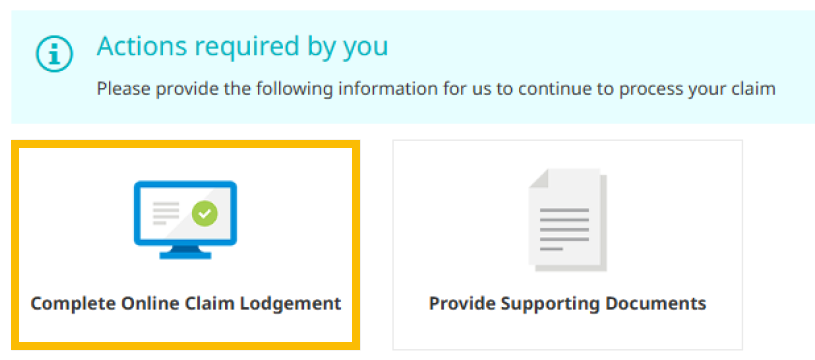
Then, select the Claim Lodgement form linked in Actions required by you.
Provide claim details
The Lodgement Form will ask you to provide:
- Medical details - On the condition you’re claiming for
- Treating Doctor details - Details of your treating practitioners
- Employer details - Employer contact details and employment history
- Declaration - Acknowledgement and signature on the Privacy Policy
- Authority - Acknowledgement and signature to release and receive personal information.
We will use the details you provide, and with your authority, to contact your treating doctor and a specalist on your behalf so that you don’t need to.
We will ask them to complete two Medical Statements.
Providing these details can help us speed up the process and do a thorough assessment
We will only ask you for essential information to progress your claim.
2. Upload supporting documents
You can choose to provide the following if you have them available:
- Third Party Authorities (if applicable)
- Medical reports, scans, referral letters, or insurance/compensation.
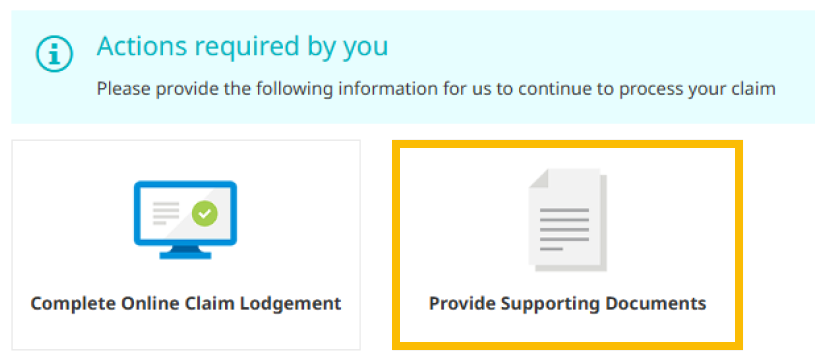
Open your claim and click Provide Supporting Documents.
- Use the Add Other Document button in the top-right.
- Select Medical Statement or other document type from the dropdown menu.
- Add a description for each file.
- Drag and drop your files into the box, or click Add File to browse for the files.
- Click Create Document to finish.
If you have given us authority in your lodgement form, we will contact your treating doctors and employer on your behalf so that you don’t need to.
If you already have medical statements, and would like to upload them, this is what they need to include.
We need 2 medical statements:
- One from your Specialist
- One from your Doctor or GP who has treated you for the condition
What do the statements need to include?
All required details do not need to be on a Medical Statement Proforma but this is usually how it is provided.
- Diagnosis - Clear identification of the medical condition
- Prognosis - Confirmation that the illness is terminal, including expected progression and life expectancy if known
- Symptom History - When symptoms first appeared and how they have developed over time
- Treatment History - Details of treatments provided, including medications, procedures, and outcomes
- Consultation Dates - First and most recent dates of consultation
- Medical Practitioner Details - Full name, specialty, practice address, phone number, and email
Next steps
Your claim will be assigned to a dedicated MetLife case manager for review. They will be in contact if we need any additional information from you.
After a decision is made, your fund will contact you to discuss next steps including payment information.
Check your claim’s status anytime on your MetLife Insurance Portal dashboard or read our guide to claims language, which breaks down the key terms we use.
We're here to help you through every step of your claim.
Call us on 1800 221 599 or email auclaims@metlife.com with your claim number in the subject line.
Guide to claims language
Navigating claims and the way we talk about claims can be overwhelming. Here’s a simple breakdown to guide you through the terms you may come across.

Lodging claims
Your lodgement hasn’t been completed, so your claim hasn’t been submitted to us for assessment yet. When you’re ready, fill out the Claim lodgement and upload the supporting documents to progress your claim.
We need some documents from you before we can move your claim along. You can submit the required documents in the Providing Supporting Documents tab with any other relevant information.
Assessing claims
Your lodgement form and supporting documents have been successfully submitted for review. A dedicated case manager will soon be in touch to guide you through the process.
Your claim has successfully met our initial requirements and has been provisionally accepted. Your dedicated case manager will begin assessing your claim within the next 3 days.
Your claim is being carefully assessed by your dedicated case manager. Once this is complete, the decision will be shared with the Superannuation Fund/Administrator (Trustee) for final approval.
Your Superannuation Fund/Administrator (Trustee) is carefully reviewing your claim, and you can expect a decision within 15 working days. We understand this is an important moment for you, and we will update you as soon as a decision has been reached.
Approved (TPD & TI Claim) & Approved Ongoing (IP Claim) means that both MetLife and your Superannuation Fund/Administrator (Trustee) have recognised your needs and agreed to approve your claim.
Support available to you now
Personalised care to support you through life’s toughest moments.
We understand this may be an incredibly challenging time for you and your loved ones.
To support you as best we can, access to MetLife’s 360Health wellbeing services—including mental health support—is also available to your family*, at no extra cost.