
Lodging your Total Permanent Disablement claim
We know this is a difficult time, but we’re here to support you with clear steps.
Find the right steps for you
If you're lodging a Total Permanent Disablement (TPD) claim, stay here. For Terminal Illness (TI) or Income Protection (IP), click your claim type.
Access your claim
If you need help, contact us at MetLife on 1800 221 599 (Mon-Fri, 9am–5pm AEST, excluding national public holidays).
1. Complete the Online Claim Lodgement form
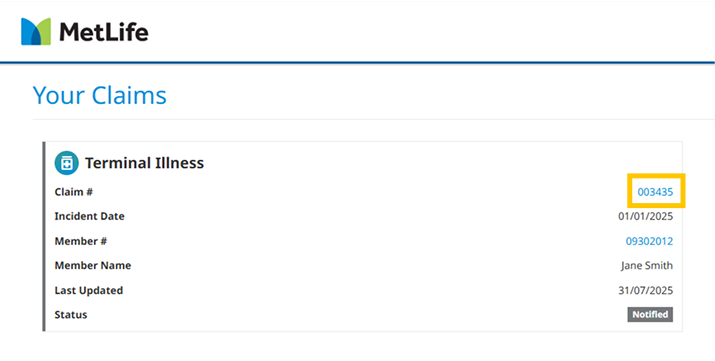
Open your claim
On the dashboard, click your claim number (e.g. 123456) to open your claim. This is where you’ll find all the information and steps to complete your claim.
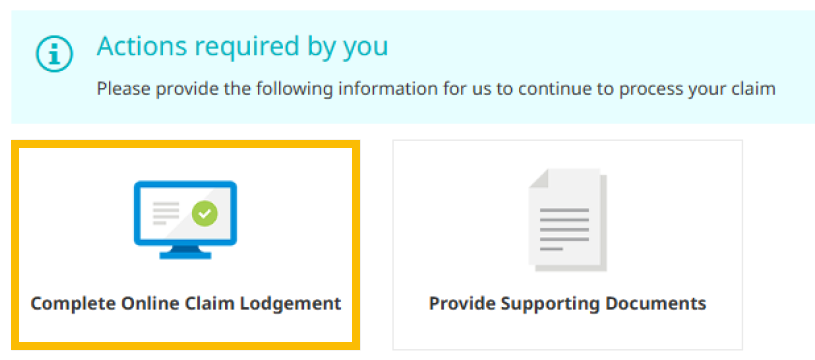
Then, select the Claim Lodgement form linked in Actions required by you.
Provide details condition and treating doctor(s)
Help understand your condition and let us collaborate with your doctor for any follow-ups.
The Lodgement Form will ask you to provide:
- Medical details - On the condition you’re claiming for
- Treating Doctor details - Details of your treating practitioners
- Employer details - Employer contact details and employment history
- Declaration - Acknowledgement and signature on the Privacy Policy
- Authority - Acknowledgement and signature to release and receive personal information.
Verify your identity
To progress your claim, you will also need to verify your identity by providing:
- 2 forms of ID with your full name (your name must match on both)
- At least 1 of these must be Government-issued* (e.g. Drivers license or Australian passport)
If you provide an ImmiCard and/or Marriage Certificate, you will need to provide additional IDs to meet the criteria.
*Check the portal for a list of the approved documents.
Before submitting, carefully check your responses and the information you’ve provided. You won’t be able to make any changes to the form after submitting.
Providing these details can help us speed up the process and do a thorough assessment
We will only ask you for essential information to progress your claim.
2. Upload supporting documents
After completing your Claim Lodgement form, there may be certain documents you’ll need to provide so we can progress your Income Protection claim.
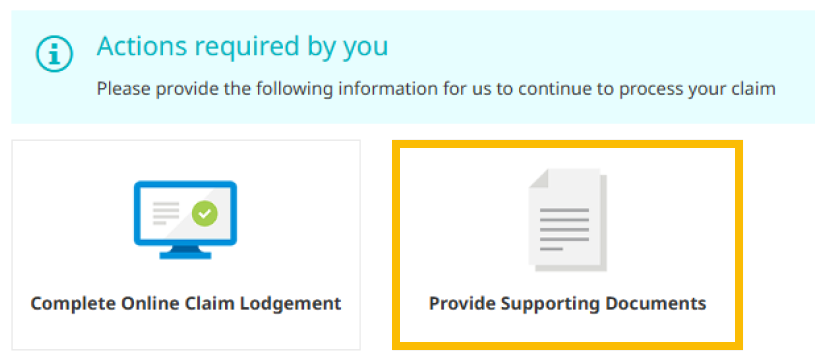
Check if you need to upload documents by clicking the Provide supporting documents option in Actions required by you inside of your claim.
Upload documents
- Open your claim and click Provide supporting documents.
- Use the Add Other Document button in the top-right.
- Select the document type from the dropdown menu.
- Add a description for each file.
- Drag and drop your files into the box, or click Add File to browse for the files.
- Click Create Document to finish.
Check everything is correct before submitting, as you won’t be able to make changes after.
3. Next steps
Now that your claim is lodged, we’ll handle the next steps. With your consent, we’ll contact your treating doctors and employer directly to get more information, so you don’t have to.
We will ask your:
- Employer to complete the Employer Statement online.
- Doctor to fill out the Medical Statement.
After we receive these documents, we’ll assign a dedicated case manager to your claim. Your case manager will contact you if we need anything else.
Your Superfund will be in contact following a decision to discuss next steps with you, including payment information.
Check your claim’s status anytime on your MetLife Insurance Portal dashboard or read our guide to claims language, which breaks down the key terms we use.
We're here to help you through every step of your claim.
Call us on 1800 221 599 or email auclaims@metlife.com with your claim number in the subject line.
Guide to claims language
Navigating claims and the way we talk about claims can be overwhelming. Here’s a simple breakdown to guide you through the terms you may come across.

Lodging claims
Your lodgement hasn’t been completed, so your claim hasn’t been submitted to us for assessment yet. When you’re ready, fill out the Claim lodgement and upload the supporting documents to progress your claim.
We need some documents from you before we can move your claim along. You can submit the required documents in the Providing Supporting Documents tab with any other relevant information.
Assessing claims
Your lodgement form and supporting documents have been successfully submitted for review. A dedicated case manager will soon be in touch to guide you through the process.
Your claim is being carefully assessed by your dedicated case manager. Once this is complete, the decision will be shared with the Superannuation Fund/Administrator (Trustee) for final approval.
Your Superannuation Fund/Administrator (Trustee) is carefully reviewing your claim, and you can expect a decision within 15 working days. We understand this is an important moment for you, and we will update you as soon as a decision has been reached.
Approved (TPD & TI Claim) & Approved Ongoing (IP Claim) means that both MetLife and your Superannuation Fund/Administrator (Trustee) have recognised your needs and agreed to approve your claim.
Support available to you now
Personalised care to support you through life’s toughest moments.
We understand this may be an incredibly challenging time for you and your loved ones.
To support you as best we can, access to MetLife’s 360Health wellbeing services—including mental health support—is also available to your family*, at no extra cost.